Operational security (OPSEC) is the discipline of protecting your
identity and other sensitive information by thinking about what an adversary can observe.
Tools matter, but the useful starting point is a threat model: what you need to protect, from
whom, for how long, and what failure would cost you.
OPSEC Fundamentals — What Operational Security Actually Means
Operational security is not a product you install — it's a process you follow
consistently. The term originates from military intelligence and refers to the practice of
identifying
what information an adversary could use against you, then systematically eliminating its
availability.
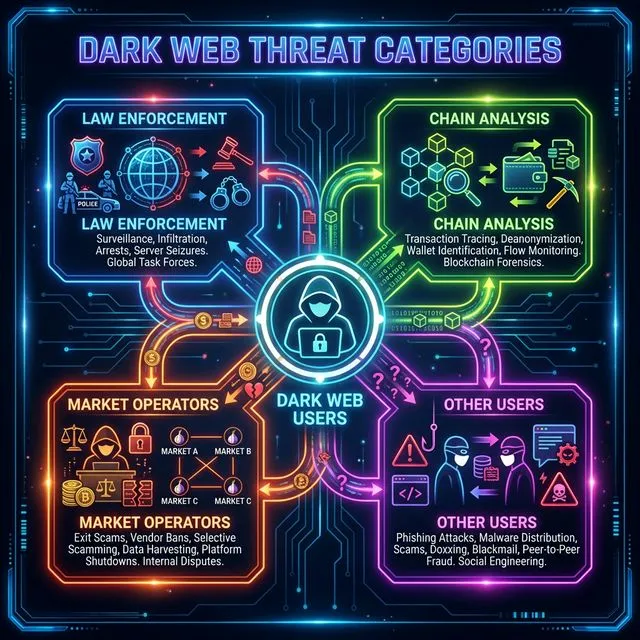
In the context of dark web usage, your adversary model typically includes law enforcement
agencies,
chain analysis firms, malicious market operators, and other users attempting to de-anonymize
you.
OPSEC failures are usually cumulative. An old username, an email header, a payment record, and a
repeated schedule may look harmless on their own. Together they can identify one person. Public
cases involving Silk Road and AlphaBay are useful because they show investigators combining
technical evidence with ordinary records rather than defeating anonymity with one magic tool.
Effective OPSEC operates on the assumption that you will make mistakes, and
designs
systems to limit the damage when mistakes occur. This means using tools that prevent accidental
information
leakage (like Tails OS, which cannot write to your hard drive), creating strict separation
between
identities (so one compromised identity doesn't cascade to others), and following checklists
rather than
relying on memory. The rest of this guide provides those checklists.
The four primary threat categories for dark web users, each requiring different
defensive
strategies.
Operating System Isolation — Your First Line of Defense
Your operating system is the foundation of your security posture. Using your everyday Windows or
macOS
installation for dark web activity is the single most common and most dangerous OPSEC failure.
Your daily
OS contains your real name, email accounts, browser history, saved passwords, location data, and
hundreds of other identifying artifacts. A single software vulnerability, a misclicked link, or
a
malicious file download could expose all of this information.
Choosing Your Environment
Three setups cover most threat models without ranking one as universally "best":
Tor Browser on a supported OS — browser-level privacy with minimal setup
Tails — amnesic live USB when local traces between sessions are the concern
Whonix — Gateway/Workstation VMs when you need persistence with network
separation
Strengths, limits, the Tails Unsafe Browser exception, host dependency for Whonix, and a
five-question decision walkthrough are in
Tails vs Whonix vs Tor Browser.
Match the system to the risk
Tor Browser on a maintained daily computer is not automatically a failure. Tails or Whonix
help when local traces, malware isolation, or identity cross-contamination are in your threat
model — but extra complexity also creates new ways to slip up. Choose deliberately.
Network Security — Protecting Your Connection
Your network connection is the physical link between your anonymous activity and your real-world
location. Network OPSEC ensures that this link cannot be traced back to you.
Tor Best Practices
Get Tor Browser from the Tor Project, an official
mirror, or GetTor, and verify the download before running it
Leave letterboxing enabled — current Tor Browser groups resized viewports into common size
buckets to reduce screen-based fingerprinting
Never install browser extensions or plugins — each addition creates a unique fingerprint
that can
distinguish your browser from others
Be cautious when opening downloaded documents in external applications while online;
embedded resources can make connections outside Tor Browser
Use Tor bridges when direct Tor connections are blocked
or identifying Tor use is a concern; transports differ and effectiveness varies by network
The VPN Question — Why VPNs Are Not Always Your Friend
A VPN adds a provider that can see the user's real IP address and the timing of the Tor
connection. Without a VPN, the local internet provider can usually tell that Tor is in use but
not which destinations are visited through it. With a VPN, that observation moves to the VPN
provider. Whether this helps depends on the threat model and on what records each provider
keeps.
A VPN before Tor can hide Tor connections from the local network, but it gives the VPN provider
a stable view of the user's IP address and connection timing. Tor bridges are designed
specifically to make Tor use harder to identify and may be the better fit when censorship is
the problem. The Tor Project
generally advises against combining a VPN with Tor unless the
user understands the configuration and trade-offs.
WiFi and Physical Connection Security
A home network, workplace, hotel, or public access point can each create different records.
Public Wi-Fi is not automatically safer: cameras, captive portals, travel patterns, and local
device logs may add identifying evidence. A MAC address is visible to the local network but is
not sent through Tor to a website. Tails enables MAC address anonymization by default, though
hardware and network behavior still matter. Pick a connection only after considering the
observer you are trying to protect against.
Identity Compartmentalization — The Golden Rule
Compartmentalization means keeping separate identities completely isolated from each other. Your
real
identity, your dark web pseudonym(s), and any intermediate identities should share zero overlap
in
usernames, passwords, communication styles, or behavioral patterns.
The Identity Separation Checklist
Never reuse a username that you've used on any clearnet platform — name searches are
trivially easy
and have de-anonymized countless users
Never reuse passwords between dark web accounts and clearnet accounts — password database
breaches
on one side can expose the other through credential stuffing
Use a dedicated password manager (e.g., KeePassXC) with a separate database for dark web
credentials
— never store dark web passwords in your regular password manager
Generate unique PGP key pairs for each separate identity
—
a shared PGP key between identities permanently links them
Be conscious of your writing style — linguistic analysis (stylometry) can match anonymous
posts to
known writing samples through vocabulary, punctuation patterns, and sentence structure
Never access dark web accounts from your regular browser, email, or device — session
cookies, stored
credentials, and browser fingerprints create cross-identity links
Never discuss real-world details (location, timezone, occupation, personal events) under a
pseudonym — seemingly innocuous details compound into a uniquely identifying profile
Stylometry has limits
Writing patterns can provide clues, especially when an analyst has long samples and a small
set of candidate authors. Accuracy figures depend heavily on the study design and should
not be treated as universal. Automated paraphrasing is not a reliable fix and may introduce
a different recognizable pattern. The safer lesson is to avoid publishing unnecessary
biographical details and to remember that repeated language can become one clue among many.
Cryptocurrency and Financial Metadata
A blockchain is only one part of a payment trail. Exchanges, banks, wallet software, remote
nodes, merchants, devices, and trading partners can all create records. A privacy feature on the
chain does not delete information already collected somewhere else.
Know what the ledger exposes — Bitcoin publishes addresses, amounts, and transaction links,
while Monero conceals more of that data by default
Read an exchange or wallet provider's privacy and retention terms before relying on it
Follow the laws, reporting duties, and service terms that apply in your jurisdiction
Protect recovery phrases and private keys from theft, cloud exposure, and accidental loss
Verify wallet software and updates through the project's official signatures or hashes
Understand remote-node metadata — a remote service may observe connection and broadcast
details even when it cannot read protected transaction fields
Treat claims such as “untraceable” or “no logs” as claims to investigate, not guarantees
Physical Security — The Overlooked Layer
Digital OPSEC is meaningless if physical security is neglected. The most secure cryptographic
setup
cannot protect you if an adversary has physical access to your devices.
Device Security
Enable full-disk encryption on devices that hold sensitive material. For Tails users, the
persistent
storage partition is encrypted by default. For Whonix users, the host OS should have full-disk
encryption
enabled (BitLocker on Windows, FileVault on macOS, LUKS on Linux). Use a strong passphrase — not
a
short PIN — for encryption. Encryption protects data best when the device is powered off and
the key is not in memory. It does not protect an unlocked session, weak credentials, cloud
copies, or information already shared elsewhere.
Physical Environment Checklist
Lock screens immediately when stepping away from the computer — even briefly
Be aware of security cameras in your environment, especially when using dark web services in
semi-public spaces (coffee shops, libraries, co-working spaces)
Never discuss dark web activity verbally in locations where you could be overheard or
recorded
Store Tails USB drives and hardware wallets in a non-obvious location — not labeled, not
with your
regular tech accessories
Use a privacy screen on your laptop to prevent shoulder surfing — viewing angles beyond 30
degrees
see a blacked-out display
If you receive physical deliveries connected to dark web transactions, understand that
packages
create a physical trail including postal tracking, delivery confirmation, and potentially
surveillance
by postal inspectors
Documented OPSEC Failures — Learn from Others' Mistakes
Public investigations show that identification usually comes from several clues collected over
time. The useful lesson is not that one trick would have prevented everything, but that small
records become much more revealing when they can be joined.
Reusing a username across platforms
An early “altoid” forum post advertised Silk Road. A later post from that account included
an email address registered to Ross Ulbricht. Investigators combined those posts with
court-authorized records and other evidence; the username was an early lead, not the whole
case.
Leaking a personal email through server misconfiguration
Alexandre Cazes (AlphaBay) configured the platform's password recovery system to send emails
from
his personal Hotmail address, pimp_alex_91@hotmail.com. This address, which included his
birth year, was linked to his real identity through other online accounts. One
misconfigured service exposed information that could be joined with separate records.
Connecting to infrastructure from a home IP
Direct administrative connections have appeared as evidence in several investigations.
Whether one record is conclusive depends on the surrounding evidence, but server and
provider logs can connect an online role with a subscriber account.
Boasting about illegal activity on social media
Attributed social accounts can expose faces, locations, social connections, schedules, and
media metadata. Those records may survive deletion through platform retention, screenshots,
or legal requests.
Using clearnet services for dark web communication
Mainstream email and messaging providers may retain account identifiers, IP logs, device
data, contacts, and recovery information. Requirements differ by service: some request a
phone number, while others do not. Encryption can protect message content without removing
all of that metadata.
Frequently Asked Questions About OPSEC
What is the safest operating system for dark web browsing?
There is no universally safest operating system. Tor Browser, Tails,
and Whonix fit different threat models around persistence, amnesia, and host
dependency. The Tails vs Whonix vs Tor
Browser guide compares them without picking a single winner.
Can a VPN replace Tor for dark web access?
No. A VPN does not provide access to onion services and is not a
substitute for Tor. The Tor Project generally advises against combining a VPN with Tor
unless an advanced user understands the configuration and its trade-offs.
How do I know if my OPSEC has been compromised?
In most cases, you won't know until it's too late. This is why OPSEC
is a
preventive discipline, not a reactive one. Warning signs include unusual account
activity, login
attempts from unrecognized locations, PGP key challenges that fail, or contacts
reporting suspicious
messages from your accounts. If you suspect a compromise, generate new credentials,
create new
identities, and abandon the compromised pseudonym entirely — do not attempt to "fix" a
compromised
identity.
Is JavaScript safe to enable in Tor Browser?
JavaScript adds browser features that can increase the attack
surface, but Tor Browser enables it at the Standard level for compatibility. Safer
disables JavaScript on non-HTTPS sites, while Safest disables it by default everywhere.
The Tor Browser security levels guide
explains each preset and when sites break.