Tor Browser is the client maintained by the Tor Project for reaching
the Tor network and onion services. This guide covers the download, signature check,
installation, and first connection — not every post-install setting.
Tor Browser is a modified version of Firefox that routes its own browser traffic through the Tor
network. It does not route every application on the computer. Under normal operation, websites
see a Tor connection rather than the user's home IP address, while the local internet provider
can see a connection to Tor but not the destination sites. That is useful privacy, not a
promise of perfect anonymity.
The browser is maintained by the Tor Project, a 501(c)(3) nonprofit organization founded in 2006.
Development is funded through a combination of government grants (historically from the U.S.
State
Department and DARPA), private foundations (including the Electronic Frontier Foundation), and
individual
donations. The codebase is open-source, audited regularly, and the project publishes
transparency reports
detailing its funding sources.
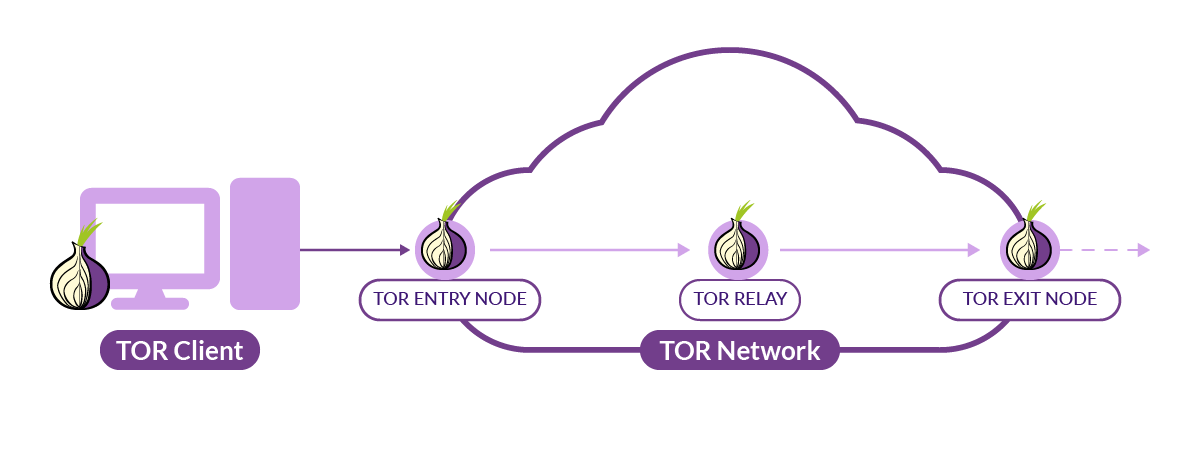
Unlike a commercial VPN, Tor distributes the route across independently operated relays. No
individual relay normally sees the complete path. That design reduces the need to trust one
provider, though a powerful observer able to watch traffic at both ends may still attempt
timing correlation. Tor is used by journalists, whistleblowers, researchers, people facing
censorship, and readers who need access to onion services.
The size of the network changes from day to day as relays join and leave. The Tor Project
publishes current relay and user estimates on Tor Metrics, which is more useful than a number copied into an
article and left to age.
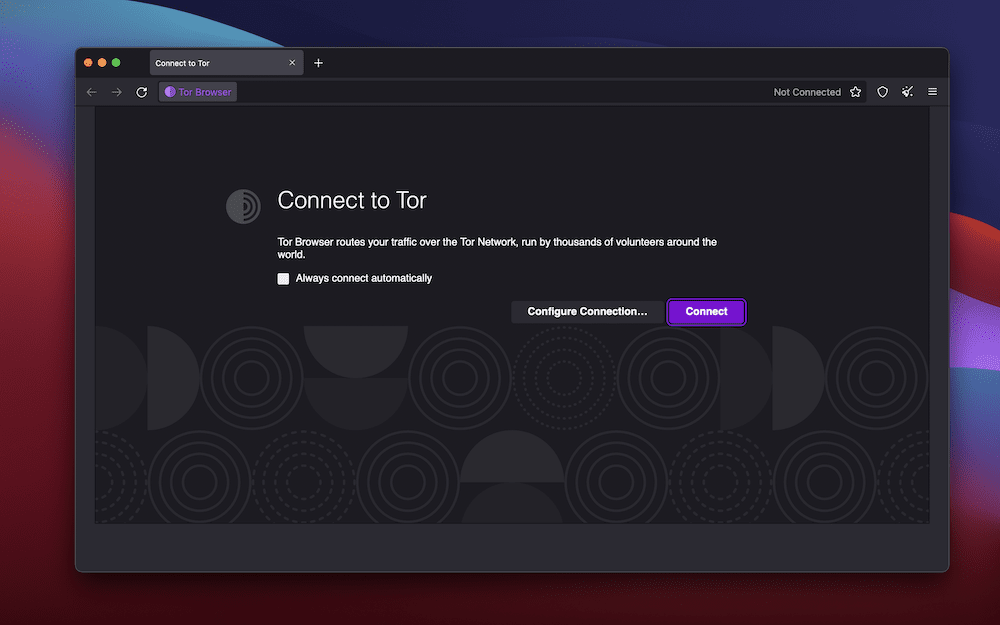
Tor Browser's connection screen displays the current relay circuit and confirms
encrypted
routing through multiple nodes.
How to Download Tor Browser — Step by Step
Downloading Tor Browser takes only a few minutes, but skipping verification can expose you to
compromised builds. Malicious actors have distributed trojanized Tor Browser installers through
third-party
download sites, torrent networks, and even paid search ads. Use the Tor Project website,
one of its official mirrors, or GetTor, then verify the file before installation.
Navigate to the official Tor Project download page. Open
any
standard web browser and go to https://www.torproject.org/download/. This is
the only
legitimate source for Tor Browser downloads. Do not trust links from forums, social media
posts, or
search engine advertisements — even if they appear to point to torproject.org. Bookmark the
official URL
after your first visit to avoid typosquatting domains like "torpr0ject.org" or "
torprojekt.org" that
host infected installers.
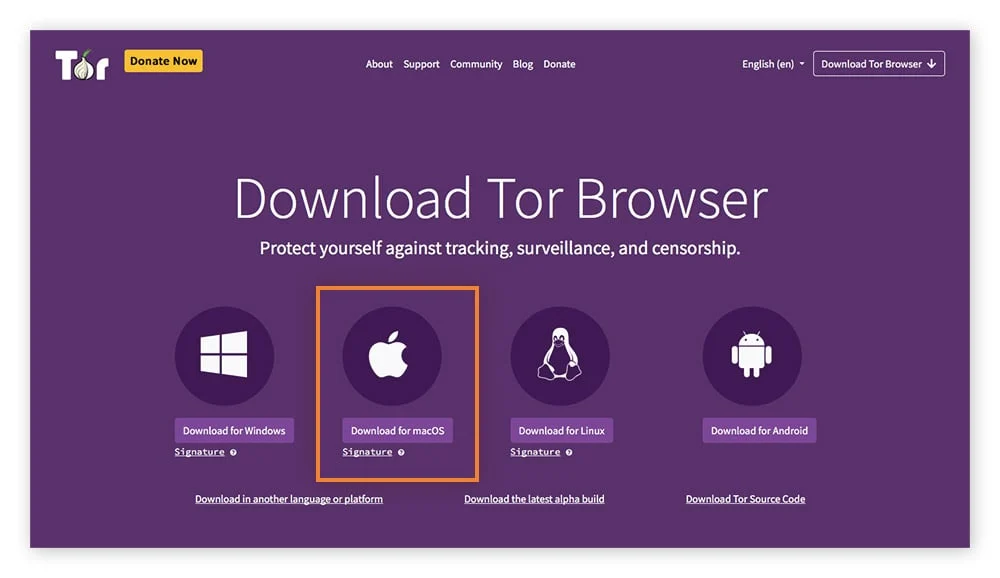
Select the build for your operating system.
The current Tor Project requirements list Windows 10 and 11,
macOS, 64-bit Linux, and Android 5.0 or newer. There is no Tor Browser for iOS. The Tor
Project recommends Onion Browser on iOS, while noting that Apple's WebKit requirement keeps
it from offering all of Tor Browser's privacy protections.
Download the installer and the signature file. Next to
each
download link, the Tor Project provides a corresponding .asc signature file.
Download both
the installer and the signature file to the same folder. The signature file is small —
typically under 1
KB — and contains a PGP signature that cryptographically proves the installer was built and
signed by the
Tor Project's release key. Without this verification step, you cannot confirm the file
hasn't been
tampered with during transit.
Verify the signature before installation. Import the Tor
Project signing key, then run
gpg --verify downloaded-file.asc downloaded-file with your actual filenames.
For fingerprint checks and reading Good or BAD output, see the
PGP signature verification guide.
Install or extract the browser. On Windows, run the
.exe installer and choose your installation directory — Tor Browser works
perfectly from a
USB drive if you want portability. On macOS, open the .dmg and drag Tor Browser
to your
Applications folder. On Linux, extract the .tar.xz archive and run
start-tor-browser.desktop from the extracted directory. No administrator or
root privileges
are required on any platform — Tor Browser runs entirely in user space.
Launch Tor Browser and establish a connection. On first
launch, Tor Browser presents a connection dialog. Click "Connect" to establish a standard
Tor circuit. Connections to ordinary websites use an exit relay; connections to onion
services stay inside Tor and do not use an exit — see
how onion services work for the mechanics. When the
connection succeeds, Tor Browser opens its own start page.
The Tor Project download page provides current installers and their signature files.
After Install: Security Level
Tor Browser's shield icon controls Standard, Safer, and Safest — presets that disable
JavaScript, fonts, media, and other features to shrink browser attack surface. Higher levels
break more sites; they are not an anonymity on/off switch.
Pick a level once Tor connects. The full comparison, common misconceptions, and Android notes are
in the Tor Browser security levels guide.
If Tor Will Not Connect
When bootstrap stalls because your network blocks Tor, you may need a bridge or another
circumvention transport. That is a connection problem, not an installer problem — configure it
from Tor Browser's connection settings after installation.
Transport choices, official ways to request bridges, and troubleshooting are covered in
Tor bridges explained.
Common Tor Browser Mistakes That Compromise Anonymity
Downloading and installing Tor Browser correctly is only half the equation. The other half is
using it
without undoing the anonymity protections it provides. These are the most common mistakes that
lead to
de-anonymization, based on documented cases and published research from security conferences.
Disabling or working around letterboxing
Tor Browser groups window dimensions into common sizes to make screen-based fingerprinting
less useful. When the window is resized or maximized, its letterboxing feature adds margins
around the page to preserve those size buckets. Resizing is therefore not the simple
identity leak it once was, but disabling letterboxing or heavily customizing the browser
can still make your setup more distinctive. The Tor Project explains the current behavior
in its fingerprinting documentation.
Downloading and Opening Files Through Tor
Files downloaded through Tor Browser — PDFs, Word documents, executables — may contain
embedded
resources that trigger connections outside the Tor network when opened. A PDF with an
embedded remote
image will make a direct HTTP request to fetch that image, bypassing Tor entirely and
revealing your real
IP address to the image host. Always disable automatic file opening and use an air-gapped or
sandboxed
environment (like Tails or a virtual machine) to open downloaded files.
Using Tor Browser for Personal Accounts
Logging into an account tied to your name tells that service who you are for that site. It
does not automatically identify every other tab, but it defeats anonymity toward the
account provider and may create records connecting the account with Tor use. Keep that
distinction in mind before signing in.
Installing Extensions or Modifying about:config
Tor Browser standardizes many browser characteristics so users are harder to distinguish.
Adding
extensions — even privacy-focused ones like uBlock Origin or NoScript (already built into
Tor Browser) —
changes your browser fingerprint and makes you uniquely identifiable. Similarly, modifying
about:config preferences can alter behavior in ways that distinguish you from
other Tor
users. Use Tor Browser as-is, with zero modifications.
Using Tor Over VPN Without Understanding the Implications
Running Tor Browser while connected to a VPN doesn't necessarily increase anonymity — it
shifts trust
from your ISP to your VPN provider. The VPN provider now knows you're using Tor, and if they
log
connection metadata, that information could be subpoenaed. Some threat models justify
VPN+Tor (e.g., when
your ISP blocks Tor and bridges are unavailable), but most users should connect to Tor
directly. The Tor
Project's own documentation advises against VPN+Tor for general use.
Torrenting Through Tor
BitTorrent clients ignore proxy settings and make direct UDP connections that bypass Tor
entirely,
leaking your real IP address to every peer in the swarm. Even if you configure the torrent
client to use
Tor as a SOCKS proxy, tracker announces and DHT queries will bypass the proxy. Tor Browser
is not
designed for file sharing — use it exclusively for web browsing.
Tor Browser vs VPN — Key Differences Explained
Tor and VPNs both route traffic through intermediary servers, but they operate on fundamentally
different
trust models and serve different purposes. Understanding these differences prevents users from
applying the
wrong tool to their threat model.
Feature
Tor Browser
VPN Service
Trust model
Distributed — no individual relay normally sees the full path
Centralized — one provider handles the routed connection
Operator accountability
Volunteer relays, no commercial entity
Commercial company, subject to legal jurisdiction
Speed
Slower (3+ relay hops, volunteer bandwidth)
Faster (single hop, dedicated infrastructure)
.onion access
Yes — native support
No — VPNs cannot resolve .onion addresses
IP rotation
New requests move to fresh circuits after roughly 10 minutes; existing streams stay put
Tor Browser can reach onion services; a standard VPN cannot. A VPN may be more practical when
the goal is simply to change the IP address seen by an ordinary website while keeping higher
speeds. These tools solve different problems, and adding one to the other does not
automatically improve privacy.
Tor routes traffic through three independent relays compared to a VPN's single-hop
architecture
— distributing trust instead of centralizing it.
Platform-Specific Installation Notes
Windows
The Windows installer does not require administrator privileges and can install Tor Browser in
a user-selected folder. If antivirus software or SmartScreen raises a warning, do not assume it
is a false positive and do not add a blanket exclusion. Verify the package signature first,
compare the warning with current Tor Project support information, and investigate any mismatch
before running the file.
macOS
On macOS, open the downloaded .dmg and drag Tor Browser into the Applications
folder. If macOS refuses to open it, stop and confirm that the file came from the official
download page and that its signature verifies before changing any security setting. The Tor
Project's installation page tracks current macOS requirements and known issues.
Linux
Linux distributions do not require an installer — extract the .tar.xz archive and
run the
start-tor-browser.desktop launcher. Some distributions include Tor Browser in their
package
repositories (for example, torbrowser-launcher on Debian/Ubuntu), but package
versions and update paths vary. Compare the version with the current Tor Project release and
use the project's download page, an official mirror, or GetTor when you need the upstream
package. Tails and Whonix include Tor Browser in configurations maintained for those systems.
Android
Tor Browser for Android is available from Google Play, the Guardian Project's F-Droid
repository, and the Tor Project. It offers the same three security levels as the desktop
browser and includes bridge configuration. Orbot is a separate tool for routing supported
Android apps through Tor; it is not required simply to use Tor Browser.
What to Do After Installing Tor Browser
Once Tor Browser reaches its start page, take a minute to check the connection and understand the
controls before opening other sites.
Review Standard, Safer, and Safest — see the security
levels guide for what each preset disables
Visit check.torproject.org to confirm your Tor circuit is active — the page
should display
"Congratulations. This browser is configured to use Tor."
Verify your exit node IP address differs from your real IP by comparing the check page
result with your
known public IP from a previous non-Tor session
Bookmark your trusted .onion addresses — relying on search engines to find .onion URLs is
the primary
vector for landing on phishing clones
Enable automatic Tor Browser updates in Settings → General → Tor Browser Updates — this
ensures you
receive security patches as soon as they're released
Review the "New Identity" button (the broom icon) — clicking it closes all tabs, clears all
session
data, and builds a new Tor circuit, effectively starting a fresh anonymous session
These checks reduce common mistakes, but they do not create perfect anonymity. Tor Browser hides
your network address from sites; it cannot stop you from identifying yourself in an account,
opening a hostile file elsewhere, or sharing details that point back to you. The Tor Project's
safe-use guidance is worth revisiting as the browser changes.