
Home / Tor Bridges Explained

Tor Bridges Explained

A bridge is an unlisted first-hop relay you use when a direct Tor connection is blocked or easy to recognize on your network. It helps you reach the Tor network; it does not make Tor use invisible to every observer or replace other privacy habits.

Guard Relay, Bridge, Pluggable Transport

Three terms get mixed together. Keeping them separate makes the rest of the page easier to follow.

Ordinary guard relay
The first Tor relay in a normal circuit. Guard IPs are published in the public Tor directory, which makes them straightforward for ISPs and censors to block in bulk.
Bridge relay
A relay whose address is not listed in that public directory. You connect to it as your first hop when guards are unreachable. Many bridge setups also use a pluggable transport.
Pluggable transport
A wrapper that changes how traffic looks on the wire — for example as random bytes or HTTPS-like data. obfs4 and WebTunnel typically run to a bridge and need a bridge line. Snowflake and meek use different infrastructure; they are circumvention tools, not interchangeable labels for "another bridge type."

If Tor Browser connects without complaint, you may never need any of this. When bootstrapping stalls at a low percentage or times out, circumvention is the next place to look — after you have confirmed Tor Browser itself is installed correctly via the download guide.
What Each Party Can See

Bridges change the shape of the problem; they do not erase visibility for everyone.

Observer Typical visibility
Local network / ISP Sees you connecting to a bridge IP, a Snowflake proxy, or a front domain — not your final .onion or clearnet destination. May still infer circumvention from timing, blocking tests, or policy.
Bridge or Snowflake proxy Sees encrypted Tor traffic and knows you are a Tor client. Does not normally see destination sites the way an exit relay would for clearnet browsing.
Destination site Sees Tor traffic as usual — a Tor exit for clearnet sites, or an internal onion path for .onion services. The bridge does not replace that end of the path.

The Tor Project's censorship overview (checked October 7, 2026) describes bridges as one tool among several, not a guarantee against all surveillance.

Built-in Circumvention Options Compared

Transport What it tries to look like Bridge line needed? Trade-offs
obfs4 Unstructured random bytes rather than obvious Tor Yes — from Tor Browser, bridges.torproject.org, Telegram, or email Widely used; effectiveness varies as censors adapt
Snowflake WebRTC traffic to short-lived volunteer proxies No — built-in broker finds proxies Large rotating pool can help when static IPs are blocked; speed and uptime vary
WebTunnel Ordinary HTTPS-style web traffic Yes Useful where recognizable Tor transports are dropped but HTTPS is allowed
meek Connection to a major cloud or CDN front No bridge line in the usual sense — uses meek fronting infrastructure Often slower and heavier; can still work under strict filtering

Names and availability change between Tor Browser releases. Treat this table as a mental model and confirm current options in Tor Browser's connection settings or the Tor Project's unblocking Tor guide.

Which Option Should I Try?

There is no universal ranking — only symptoms on your network today.

Connection never passes ~10–20% bootstrap
Start with Tor Browser's Connection Assist or the built-in censored-country flow if your build includes it. Let it suggest a transport before you paste random bridge lines from an old forum post.
Direct Tor worked before; now it fails suddenly
Your ISP may have refreshed a block list. Try Snowflake or WebTunnel, then request fresh obfs4 lines through the official channels below.
Only HTTPS to major sites works; other traffic dies
WebTunnel or meek may fit better than plain obfs4 — still verify with check.torproject.org after you connect.
One transport connects but pages time out
Could be congestion, an overloaded bridge, or unrelated network issues. Switch transports, request new bridges, and compare against a non-Tor site to rule out general outages.
Do not treat one success as permanent

Censors and bridges both change over time. What worked for a colleague on another ISP may fail on yours, and the reverse is also true.

Official Ways to Obtain Bridges

Use Tor Project channels — not static bridge lines copied from blog posts or chat logs. Published addresses get blocked quickly.

  • Tor Browser request flow (Moat): During setup or in connection settings, choose the censored-country path and ask Tor Browser to request bridges for you.
  • bridges.torproject.org: Web form after a CAPTCHA or proof-of-work step, depending on current anti-abuse measures.
  • Official Telegram bot: Linked from Tor Project bridge documentation — verify you are using the bot URL from torproject.org, not an impersonator.
  • Email: Send to bridges@torproject.org from a provider the project lists in its current instructions; subject and body format matter.

Details and anti-abuse steps live in the Tor Project's getting bridges page (checked October 7, 2026).

Configuring Bridges in Tor Browser

UI labels shift between releases; the flow below matches current Tor Project documentation as of October 7, 2026. If your menu wording differs slightly, look for connection or circumvention settings.

Desktop

  • On first launch, click Configure connection (or indicate that Tor is censored) instead of connecting immediately.
  • Pick a built-in transport, use Connection Assist, or paste bridge lines into the custom bridge field — one line per bridge.
  • After Tor reaches 100% bootstrap, open check.torproject.org to confirm you are on Tor.
  • To change bridges later: Settings → Connection → Bridges (exact path may read "Tor Network" in some builds).
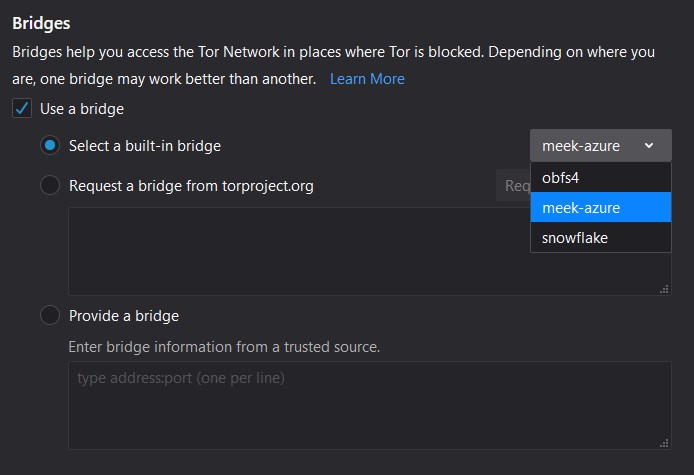
Tor Browser circumvention dialog showing built-in transport choices and a field for custom bridge lines
The connection panel is where you choose obfs4, Snowflake, WebTunnel, or paste bridge lines obtained through official channels.

Android and Tails

Tor Browser for Android includes the same circumvention concepts under its connection settings. Tails routes Tor automatically but still exposes bridge configuration when you need it at startup. Check the current Tails and Tor Project Android docs for exact menu names — they lag desktop wording by a release or two.

When Bridges Fail

Malformed bridge line
Missing transport prefix, extra spaces, or truncated lines cause immediate failure. Copy the entire line from the Tor Project response.
Stale or blocked bridge
Request new lines. Reusing a bridge that worked last month is a common dead end.
Wrong system clock
Tor relies on reasonable time settings. A laptop that slept across time zones or a VM with a skewed clock can stall bootstrap — fix time sync first.
Hosting provider blocks outbound Tor
Some VPS or campus networks block Tor ports regardless of bridges. You may need a different network entirely, not just another transport.
Slow speeds
Bridges add latency. Snowflake especially can feel uneven. Slow Tor beats no Tor, but do not confuse slowness with a broken circuit — check the bootstrap bar and check.torproject.org.
General outage vs censorship
If clearnet sites also fail, the problem may not be Tor-specific. Test ordinary browsing before burning through every transport option.

Bridges vs VPN-Before-Tor

Bridges address "I cannot reach Tor from this network." VPN-before-Tor addresses a different threat model — shifting who sees your Tor entry from your ISP to your VPN provider. Combining them is an advanced choice with trade-offs, not a default upgrade.

The Tor Project generally advises against casual VPN+Tor stacking. For broader context on when each tool fits, see the OPSEC checklist rather than treating a VPN as a bridge substitute.

Frequently Asked Questions

Do bridges slow down Tor?

Usually yes, compared with a direct guard connection. You add at least one extra hop and often a pluggable transport wrapper. Snowflake in particular can feel slower or less stable because volunteer proxies come and go. Slow but working is still preferable to a connection that never completes.

Do bridges hide Tor use from my ISP?

They can reduce obvious Tor fingerprinting on the wire, but they do not make Tor invisible to every observer. Your ISP or local network still sees that you connect to something — a bridge IP, a WebRTC proxy, or a front domain. A determined censor with broader visibility may infer Tor use through volume, timing, or blocking experiments.

Is the Snowflake volunteer proxy safe?

Snowflake proxies see encrypted Tor traffic, not your destination sites in cleartext. They function as temporary entry helpers rather than full exit nodes. You still trust the Tor protocol and the rest of the circuit; the proxy should not learn which sites you visit, though it can see that you are using Tor-related traffic patterns.

Can I keep using the same bridge indefinitely?

You can, until it stops working. Bridges can be blocked once discovered, taken offline, or overloaded. The Tor Project distributes them knowing they may be short-lived in censored regions. Request fresh lines when a bridge fails rather than assuming one address will last for months.

Why does Connection Assist pick a different transport than I expect?

Connection Assist probes what your network allows and suggests a path that might work today. That can differ from what worked yesterday or from what a friend uses on another ISP. It is a starting point, not a permanent label — if the suggested transport fails, try another manually or request new bridges.